 持久层框架之 MyBatisPlus
# MyBatis-Plus 简介
# 简介
MyBatis-Plus(简称 MP)是一个 MyBatis 的增强工具,在 MyBatis 的基础上只做增强不做改变,为简化开发、提高效率而生。
MyBatis-Plus 官方文档 (opens new window)
# 特性
- 无侵入:只做增强不做改变,引入它不会对现有工程产生影响,如丝般顺滑
- 损耗小:启动即会自动注入基本 CURD,性能基本无损耗,直接面向对象操作
- 强大的 CRUD 操作:内置通用 Mapper、通用 Service,仅仅通过少量配置即可实现单表大部分 CRUD 操作,更有强大的条件构造器,满足各类使用需求
- 支持 Lambda 形式调用:通过 Lambda 表达式,方便的编写各类查询条件,无需再担心字段写错
- 支持主键自动生成:支持多达 4 种主键策略(内含分布式唯一 ID 生成器 - Sequence),可自由配置,完美解决主键问题
- 支持 ActiveRecord 模式:支持 ActiveRecord 形式调用,实体类只需继承 Model 类 即可进行强大的 CRUD 操作
- 支持自定义全局通用操作:支持全局通用方法注入( Write once, use anywhere )
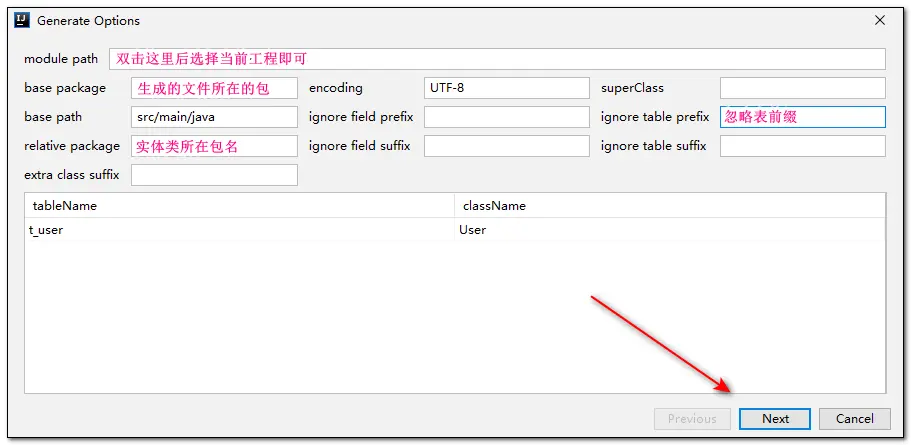
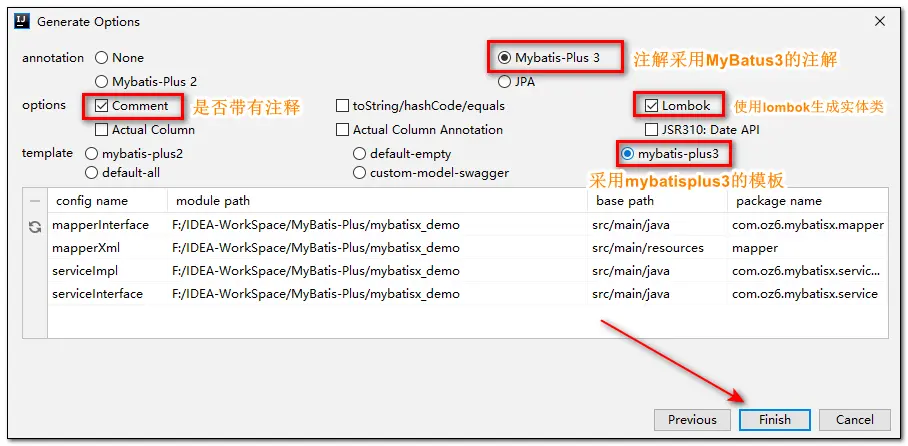
- 内置代码生成器:采用代码或者 Maven 插件可快速生成 Mapper 、 Model 、 Service 、 Controller 层代码,支持模板引擎,更有超多自定义配置等您来使用
- 内置分页插件:基于 MyBatis 物理分页,开发者无需关心具体操作,配置好插件之后,写分页等同于普通 List 查询
- 分页插件支持多种数据库:支持 MySQL、MariaDB、Oracle、DB2、H2、HSQL、SQLite、Postgre、SQLServer 等多种数据库
- 内置性能分析插件:可输出 SQL 语句以及其执行时间,建议开发测试时启用该功能,能快速揪出慢查询
- 内置全局拦截插件:提供全表 delete 、 update 操作智能分析阻断,也可自定义拦截规则,预防误操作
# 支持数据库
任何能使用 MyBatis 进行 CRUD, 并且支持标准 SQL 的数据库,具体支持情况如下:
- MySQL,Oracle,DB2,H2,HSQL,SQLite,PostgreSQL,SQLServer,Phoenix,Gauss ,ClickHouse,Sybase,OceanBase,Firebird,Cubrid,Goldilocks,csiidb
- 达梦数据库,虚谷数据库,人大金仓数据库,南大通用(华库)数据库,南大通用数据库,神通数据库,瀚高数据库
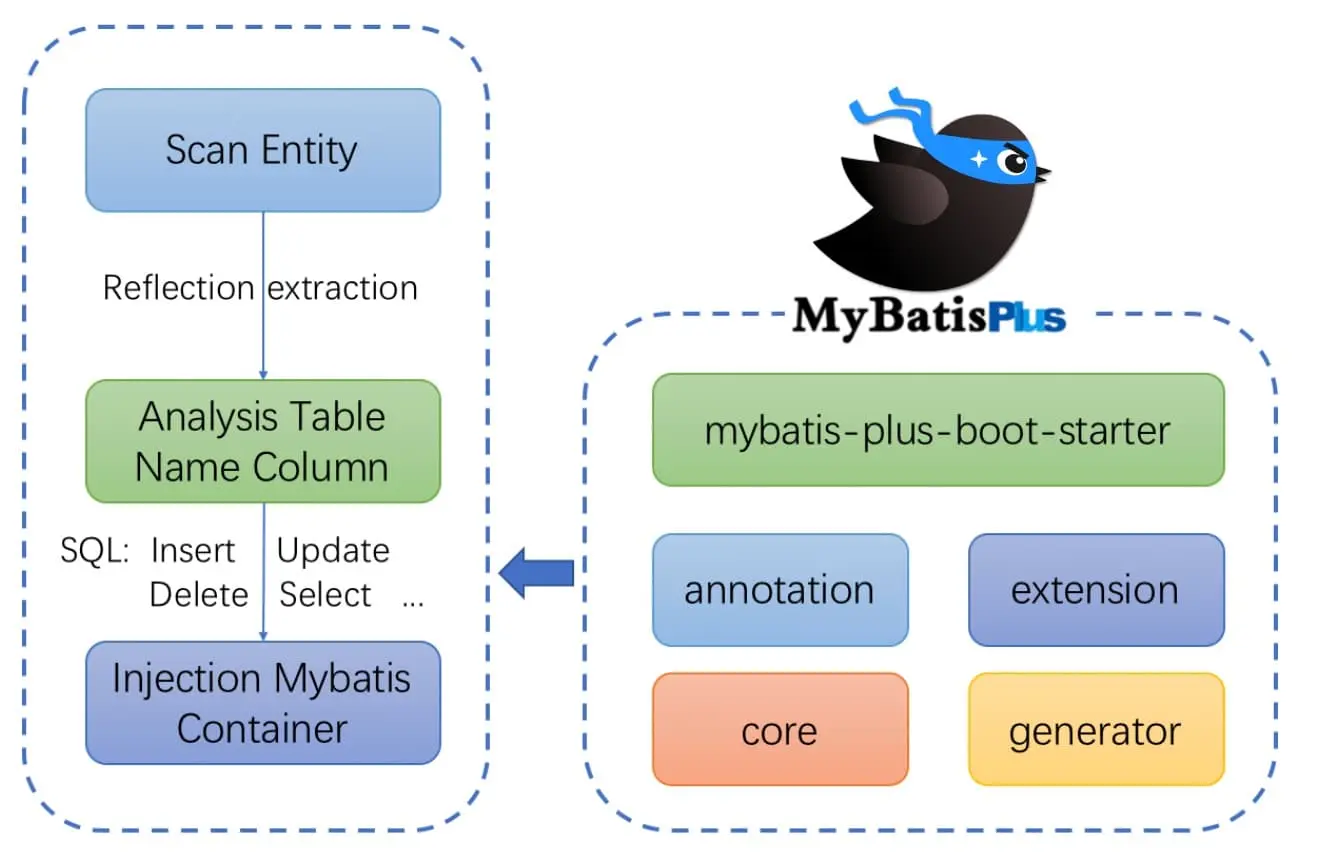
# 框架结构
# 代码及文档地址
官方地址: https://baomidou.com/ (opens new window)
代码发布地址:
Github: https://github.com/baomidou/mybatis-plus (opens new window)
Gitee: https://gitee.com/baomidou/mybatis-plus (opens new window)
# 入门案例
# 开发环境
- JDK:JDK8+
- 构建工具:maven 3.9.6
- MySQL 版本:MySQL 8.0.29
- Spring Boot:2.6.13
- MyBatis-Plus:3.5.7
# 创建数据库及表
创建表
CREATE DATABASE `mybatis_plus` /*!40100 DEFAULT CHARACTER SET utf8mb4 */;
USE `mybatis_plus`;
CREATE TABLE `user` (
	`id` BIGINT (20) NOT NULL COMMENT '主键ID',
	`name` VARCHAR (30) DEFAULT NULL COMMENT '姓名',
	`age` INT (11) DEFAULT NULL COMMENT '年龄',
	`email` VARCHAR (50) DEFAULT NULL COMMENT '邮箱',
PRIMARY KEY (`id`)
) ENGINE = INNODB DEFAULT CHARSET = utf8;
1
2
3
4
5
6
7
8
9添加数据
INSERT INTO USER ( id, name, age, email )
VALUES
	( 1, 'Jone', 18, 'test1@baomidou.com' ),
	( 2, 'Jack', 20, 'test2@baomidou.com' ),
	( 3, 'Tom', 28, 'test3@baomidou.com' ),
	( 4, 'Sandy', 21, 'test4@baomidou.com' ),
	( 5, 'Billie', 24, 'test5@baomidou.com' );
1
2
3
4
5
6
7
# 创建 Spring Boot 工程
初始化工程 mybatis_plus_demo 并添加 MyBatis-Plus Starter 依赖
<?xml version="1.0" encoding="UTF-8"?>
<project xmlns="http://maven.apache.org/POM/4.0.0" xmlns:xsi="http://www.w3.org/2001/XMLSchema-instance"
         xsi:schemaLocation="http://maven.apache.org/POM/4.0.0 https://maven.apache.org/xsd/maven-4.0.0.xsd">
    <modelVersion>4.0.0</modelVersion>
    <parent>
        <groupId>org.springframework.boot</groupId>
        <artifactId>spring-boot-starter-parent</artifactId>
        <version>2.6.13</version>
        <relativePath/> <!-- lookup parent from repository -->
    </parent>
    <groupId>com.atguigu</groupId>
    <artifactId>mybatis_plus_demo</artifactId>
    <version>0.0.1-SNAPSHOT</version>
    <name>mybatis_plus_demo</name>
    <description>mybatis_plus_demo</description>

    <properties>
        <java.version>8</java.version>
    </properties>
    <dependencies>
        <dependency>
            <groupId>org.springframework.boot</groupId>
            <artifactId>spring-boot-starter</artifactId>
        </dependency>

        <dependency>
            <groupId>org.springframework.boot</groupId>
            <artifactId>spring-boot-starter-test</artifactId>
            <scope>test</scope>
        </dependency>
        <!-- mybatis-plus 启动器 -->
        <dependency>
            <groupId>com.baomidou</groupId>
            <artifactId>mybatis-plus-boot-starter</artifactId>
            <version>3.5.7</version>
        </dependency>
        <!-- lombok 用于简化实体类开发 -->
        <dependency>
            <groupId>org.projectlombok</groupId>
            <artifactId>lombok</artifactId>
            <optional>true</optional>
        </dependency>
        <!-- mysql 驱动 -->
        <dependency>
            <groupId>mysql</groupId>
            <artifactId>mysql-connector-java</artifactId>
            <scope>runtime</scope>
        </dependency>
    </dependencies>

    <build>
        <plugins>
            <plugin>
                <groupId>org.springframework.boot</groupId>
                <artifactId>spring-boot-maven-plugin</artifactId>
            </plugin>
        </plugins>
    </build>

</project>
2
3
4
5
6
7
8
9
10
11
12
13
14
15
16
17
18
19
20
21
22
23
24
25
26
27
28
29
30
31
32
33
34
35
36
37
38
39
40
41
42
43
44
45
46
47
48
49
50
51
52
53
54
55
56
57
58
59
60
# 编写代码
# 配置 application.yml
spring:
  # 配置数据源信息
  datasource:
    # 配置数据源类型
    type: com.zaxxer.hikari.HikariDataSource
    # 配置连接数据库的各个信息
    driver-class-name: com.mysql.cj.jdbc.Driver
    url: jdbc:mysql://localhost:3306/mybatis_plus?serverTimezone=GMT%2B8&characterEncoding=utf-8&useSSL=false&allowPublicKeyRetrieval=true
    username: root
    password: 123456
2
3
4
5
6
7
8
9
10
注意:
驱动类
driver-class-name- spring boot 2.0(内置 jdbc5 驱动),驱动类使用:
driver-class-name: com.mysql.jdbc.Driver - spring boot 2.1 及以上(内置 jdbc8 驱动),驱动类使用:
driver-class-name: com.mysql.cj.jdbc.Driver - 否则运行测试用例的时候会有 WARN 信息
- spring boot 2.0(内置 jdbc5 驱动),驱动类使用:
连接地址 url
- MySQL5.7 版本的 url:
jdbc:mysql://localhost:3306/mybatis_plus?characterEncoding=utf-8&useSSL=false - MySQL8.0 版本的 url:
jdbc:mysql://localhost:3306/mybatis_plus? serverTimezone=GMT%2B8&characterEncoding=utf-8&useSSL=false - 否则运行测试用例报告如下错误:
java.sql.SQLException: The server time zone value 'Öйú±ê׼ʱ¼ä' is unrecognized or represents more
- MySQL5.7 版本的 url:
报错:
Public Key Retrieval is not allowed- mysql 8.0 默认使用
caching_sha2_password身份验证机制(即从原来 mysql_native_password 更改为 caching_sha2_password。) - 方案一:
ALTER USER 'root'@'%' IDENTIFIED WITH mysql_native_password BY 'root'; - 方案二:url 中添加
allowPublicKeyRetrieval=true
- mysql 8.0 默认使用
# 启动类
在 Spring Boot 启动类中添加 @MapperScan注解,扫描 mapper 包
package com.atguigu.mybatis_plus_demo;

@SpringBootApplication
// 扫描 mapper 接口所在的包
@MapperScan("com.atguigu.mybatis_plus_demo.mapper")
public class MybatisPlusDemoApplication {

    public static void main(String[] args) {
        SpringApplication.run(MybatisPlusDemoApplication.class, args);
    }

}
2
3
4
5
6
7
8
9
10
11
12
# 添加实体
package com.atguigu.mybatis_plus_demo.pojo;

@Data
public class User {
    private Long id;
    private String name;
    private Integer age;
    private String email;
}
2
3
4
5
6
7
8
9
# 添加 mapper
BaseMapper 是 MyBatis-Plus 提供的模板 mapper,其中包含了基本的 CRUD 方法,泛型为操作的实体类型
package com.atguigu.mybatis_plus_demo.mapper;

@Repository
public interface UserMapper extends BaseMapper<User> {}
2
3
4
# 测试
package com.atguigu.mybatis_plus_demo;

@SpringBootTest
public class MyBatisPlusTest {
    @Resource
    private UserMapper userMapper;

    @Test
    public void testSelectList() {
        // 通过条件构造器查询一个 list 集合,若没有条件,则可以设置 null 为参数
        List<User> list = userMapper.selectList(null);
        list.forEach(System.out::println);
    }
}
2
3
4
5
6
7
8
9
10
11
12
13
14
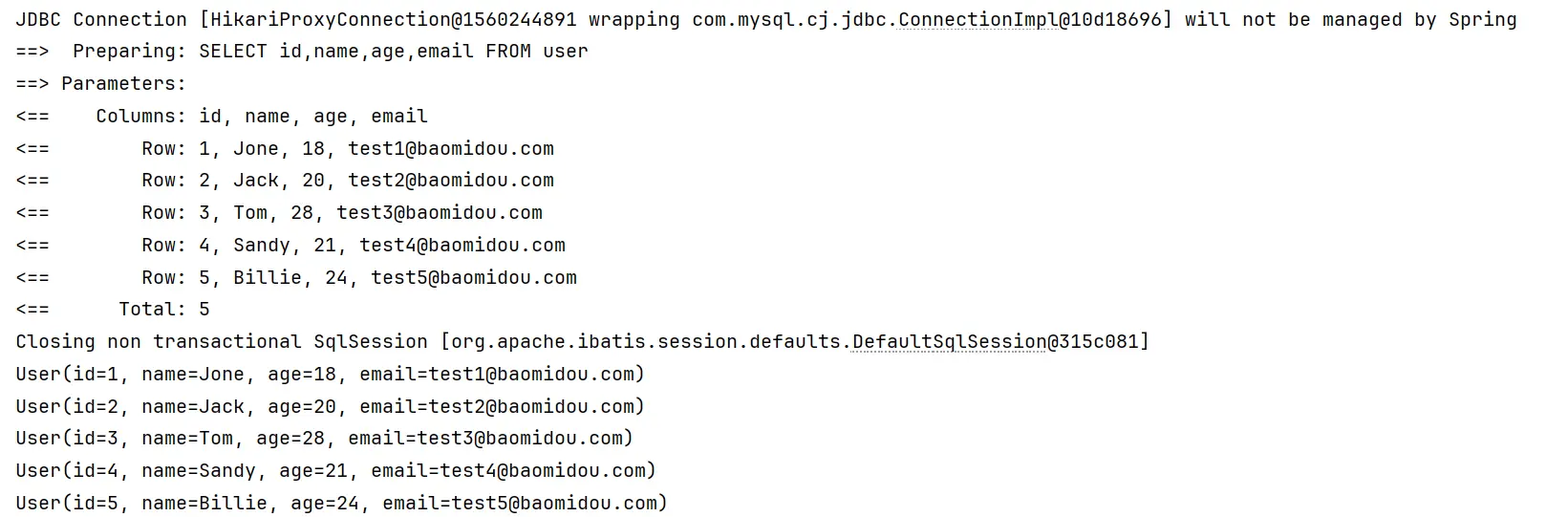
控制台打印查询结果:
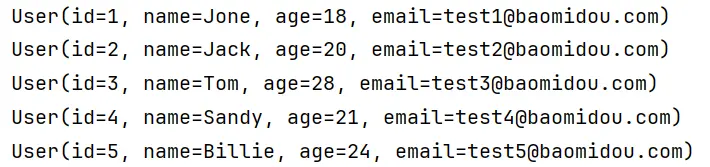
注意:
IDEA 在 userMapper 处报错,因为找不到注入的对象,因为类是动态创建的,但是程序可以正确的执行。
为了避免报错,可以在 mapper 接口上添加
@Repository注解
# 添加日志
在 application.yml 中配置日志输出
mybatis-plus:
  configuration:
    log-impl: org.apache.ibatis.logging.stdout.StdOutImpl
2
3
# 基本 CRUD
# BaseMapper<T>
说明:
- 通用 CRUD 封装 BaseMapper 接口,为 Mybatis-Plus 启动时自动解析实体表关系映射转换为 Mybatis 内部对象注入容器
- 泛型
T为任意实体对象 - 参数
Serializable为任意类型主键,Mybatis-Plus 不推荐使用复合主键,约定每一张表都有自己的唯一 id 主键 - 对象
Wrapper 为条件构造器
MyBatis-Plus 中的基本 CRUD 在内置的 BaseMapper 中都已得到了实现,因此我们继承该接口以后可以直接使用。
# 调用 Mapper 层实现 CRUD
# 插入
调用方法:
int insert(T entity);
/**
 * 实现新增用户信息
 * INSERT INTO user ( id, name, age, email ) VALUES ( ?, ?, ?, ? )
 * MyBatis-Plus 在实现插入数据时,会默认基于雪花算法的策略生成id
 */
@Test
public void testInsert() {
    User user = new User();
    user.setName("张三");
    user.setAge(23);
    user.setEmail("zhangsan@atguigu.com");
    int result = userMapper.insert(user);
    System.out.println(result > 0 ? "添加成功!" : "添加失败!");
    System.out.println("受影响的行数为:" + result);
    // 1809926831592214529(当前 id 为雪花算法自动生成的 id)
    System.out.println("id自动获取" + user.getId());
}
2
3
4
5
6
7
8
9
10
11
12
13
14
15
16
17
# 删除
通过 id 删除用户信息
调用方法:
int deleteById(Serializable id);/** * 通过 id 删除用户信息 * DELETE FROM user WHERE id=? */ @Test public void testDeleteById() { int result = userMapper.deleteById(1809926831592214529L); System.out.println(result > 0 ? "删除成功!" : "删除失败!"); System.out.println("受影响的行数为:" + result); User user = new User(); user.setId(123L); user.setAge(23); result = userMapper.deleteById(user); System.out.println(result > 0 ? "删除成功!" : "删除失败!"); System.out.println("受影响的行数为:" + result); }1
2
3
4
5
6
7
8
9
10
11
12
13
14
15
16根据 map 集合中所设置的条件删除用户信息
int deleteByMap(@Param(Constants.COLUMN_MAP) Map<String, Object> columnMap);/** * 根据 map 集合中所设置的条件删除用户信息 * DELETE FROM user WHERE (name = ? AND age = ?) */ @Test public void testDeleteByMap(){ // 当前演示为根据 name 和 age 删除数据 // 执行 SQL为:DELETE FROM user WHERE name = ? AND age = ? HashMap<String, Object> map = new HashMap<>(); map.put("name", "张三"); map.put("age", 23); int result = userMapper.deleteByMap(map); System.out.println(result > 0 ? "删除成功!" : "删除失败!"); System.out.println("受影响的行数为:" + result); }1
2
3
4
5
6
7
8
9
10
11
12
13
14
15通过多个 id 实现批量删除
调用方法:
int deleteBatchIds(@Param(Constants.COLLECTION) Collection<? extends Serializable> idList);/** * 通过多个 id 实现批量删除 * DELETE FROM user WHERE id IN ( ? , ? , ? ) */ @Test public void testDeleteByIds() { List<Long> list = Arrays.asList(1L, 2L, 3L); // 'deleteBatchIds(java.util.Collection<?>)' is deprecated int result = userMapper.deleteBatchIds(list); System.out.println(result > 0 ? "删除成功!" : "删除失败!"); System.out.println("受影响的行数为:" + result); result = userMapper.deleteByIds(list); System.out.println(result > 0 ? "删除成功!" : "删除失败!"); System.out.println("受影响的行数为:" + result); }1
2
3
4
5
6
7
8
9
10
11
12
13
14
15
# 修改
调用方法:
int updateById(@Param(Constants.ENTITY) T entity);
/**
 * 修改用户信息
 * UPDATE user SET name=?, email=? WHERE id=?
 */
@Test
public void testUpdateById() {
    User user = new User();
    user.setId(4L);
    user.setName("李四");
    user.setEmail("lisi@atguigu.com");
    int result = userMapper.updateById(user);
    System.out.println("result = " + result);
    System.out.println("user = " + user);
}
2
3
4
5
6
7
8
9
10
11
12
13
14
# 查询
根据 id 查询用户信息
调用方法:
T selectById(Serializable id);/** * 通过 id 查询用户信息 * SELECT id,name,age,email FROM user WHERE id=? */ @Test public void testSelectById(){ User user = userMapper.selectById(1L); System.out.println("user = " + user); }1
2
3
4
5
6
7
8
9根据多个 id 查询多个用户信息
调用方法:
List selectBatchIds(@Param(Constants.COLLECTION) Collection<? extends Serializable> idList);/** * 根据多个 id 查询多个用户信息 * SELECT id,name,age,email FROM user WHERE id IN ( ? , ? , ? ) */ @Test public void testSelectBatchIds() { List<Long> list = Arrays.asList(1L, 2L, 3L); List<User> users = userMapper.selectBatchIds(list); users.forEach(System.out::println); }1
2
3
4
5
6
7
8
9
10通过 map 条件查询用户信息
调用方法:
List selectByMap(@Param(Constants.COLUMN_MAP) Map<String, Object> columnMap);/** * 根据 map 集合中的条件查询用户信息 * SELECT id,name,age,email FROM user WHERE (name = ? AND age = ?) */ @Test public void testSelectByMap(){ HashMap<String, Object> map = new HashMap<>(); map.put("name", "Jack"); map.put("age", 20); List<User> list = userMapper.selectByMap(map); list.forEach(System.out::println); }1
2
3
4
5
6
7
8
9
10
11
12查询所有数据
调用方法:
List selectList(@Param(Constants.WRAPPER) Wrapper queryWrapper);/** * 查询所有数据 * 通过条件构造器查询一个 list 集合,若没有条件,则可以设置 null 为参数 * SELECT id,name,age,email FROM user */ @Test public void testSelectList() { List<User> users = userMapper.selectList(null); users.forEach(System.out::println); }1
2
3
4
5
6
7
8
9
10
通过观察 BaseMapper 中的方法,大多方法中都有 Wrapper 类型的形参,此为条件构造器,可针对于 SQL 语句设置不同的条件,若没有条件,则可以为该形参赋值 null,即查询(删除/修改)所有数据。
# 通用 Service
说明:
- IService 是 MyBatis-Plus 提供的一个通用 Service 层接口,它封装了常见的 CRUD 操作,包括插入、删除、查询和分页等。通过继承 IService 接口,可以快速实现对数据库的基本操作,同时保持代码的简洁性和可维护性。
- IService 接口中的方法命名遵循了一定的规范,如
get 用于查询单行,remove 用于删除,list 用于查询集合,page 用于分页查询,这样可以避免与 Mapper 层的方法混淆。- 泛型
T为任意实体对象- 建议如果存在自定义通用 Service 方法的可能,请创建自己的
IBaseService继承Mybatis-Plus提供的IService基类- 对象
Wrapper为 条件构造器 (opens new window)- 官方文档:持久层接口) (opens new window)
MyBatis-Plus 中有一个接口 IService 和其实现类 ServiceImpl,封装了常见的业务层逻辑,详情查看源码 IService 和 ServiceImpl
因此我们在使用的时候仅需在自己定义的 Service 接口中继承 IService 接口,在自己的实现类中实现自己的 Service 并继承 ServiceImpl 即可
# 调用 Service 层操作数据
我们在自己的 Service 接口中通过继承 MyBatis-Plus 提供的 IService 接口,不仅可以获得其提供的 CRUD 方法,而且还可以使用自身定义的方法。
创建 UserService 并继承 IService
package com.atguigu.mybatis_plus_demo.service;

/**
 * UserService 继承 IService 模板提供的基础功能
 */
public interface UserService extends IService<User> {}
1
2
3
4
5
6创建 UserService 的实现类并继承 ServiceImp
package com.atguigu.mybatis_plus_demo.service.impl;

/**
 * ServiceImpl 实现了 IService,提供了 IService 中基础功能的实现
 * 若 ServiceImpl 无法满足业务需求,则可以使用自定的 UserService 定义方法,并在实现类中实现
 */
@Service
public class UserServiceImpl extends ServiceImpl<UserMapper, User> implements UserService {}
1
2
3
4
5
6
7
8测试查询记录数
/**
 * 查询总记录数
 * SELECT COUNT( * ) AS total FROM user
 */
@Test
public void testGetCount() {
    System.out.println("总记录数: " + userService.count());
}
1
2
3
4
5
6
7
8测试批量插入
/**
 * 批量添加
 * INSERT INTO user ( id, name, age ) VALUES ( ?, ?, ? )
 */
@Test
public void testInsertMore() {
    ArrayList<User> list = new ArrayList<>();
    for (int i = 0; i < 10; i++) {
        User user = new User();
        user.setName("ybc" + i);
        user.setAge(20 + i);
        list.add(user);
    }
    boolean result = userService.saveBatch(list);
    System.out.println("result = " + result);
}
1
2
3
4
5
6
7
8
9
10
11
12
13
14
15
16
# 常用注解
MyBatis-Plus 提供的注解可以帮我们解决一些数据库与实体之间相互映射的问题。
# @TableName
经过以上的测试,在使用 MyBatis-Plus 实现基本的 CRUD 时,我们并没有指定要操作的表,只是在 Mapper 接口继承 BaseMapper 时,设置了泛型 User,而操作的表为 user 表,由此得出结论,MyBatis-Plus 在确定操作的表时,由 BaseMapper 的泛型决定,即实体类型决定,且默认操作的表名和实体类型的类名一致。
# 引出问题
若实体类类型的类名和要操作的表的表名不一致,会出现什么问题?
我们将表 user 更名为 t_user,测试查询功能 => 程序抛出异常,Table 'mybatis_plus.user' doesn't exist,因为现在的表名为 t_user,而默认操作的表名和实体类型的类名一致,即 user 表

# 解决问题
# 通过 @TableName 解决问题
在实体类类型上添加 @TableName("t_user"),标识实体类对应的表,即可成功执行 SQL 语句
@Data
// 设置实体类所对应的表名
//@TableName("t_user")
public class User {
    private Long id;
    private String name;
    private Integer age;
    private String email;
}
2
3
4
5
6
7
8
9
# 通过全局配置解决问题
在开发的过程中,我们经常遇到以上的问题,即实体类所对应的表都有固定的前缀,例如 t_ 或 tbl_
此时,可以使用 MyBatis-Plus 提供的全局配置,为实体类所对应的表名设置默认的前缀,那么就不需要在每个实体类上通过 @TableName` 标识实体类对应的表
mybatis-plus:
  # 配置 MyBatis-Plus 的全局配置
  global-config:
    db-config:
      # 设置实体类所对应的表的统一前缀
      table-prefix: t_
2
3
4
5
6
# @TableId
经过以上的测试,MyBatis-Plus 在实现 CRUD 时,会默认将 id 作为主键列,并在插入数据时,默认基于雪花算法的策略生成 id
# 引出问题
若实体类和表中表示主键的不是 id,而是其他字段,例如 uid,MyBatis-Plus 会自动识别 uid 为主键列吗?
我们实体类中的属性 id 改为 uid,将表中的字段 id 也改为 uid,测试添加功能
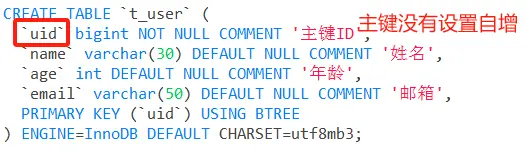
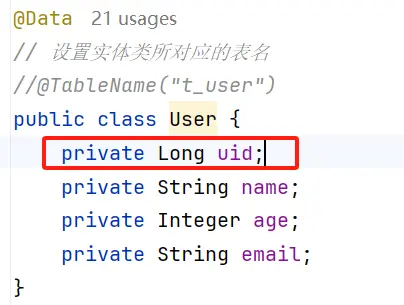
程序抛出异常,Field 'uid' doesn't have a default value,说明 MyBatis-Plus 没有将 uid 作为主键赋值

# 通过 @TableId 解决问题
在实体类中 uid 属性上通过 @TableId 将其标识为主键,即可成功执行 SQL 语句
@Data
// 设置实体类所对应的表名
//@TableName("t_user")
public class User {
    // 将属性所对应的字段指定为主键
    @TableId
    private Long id;
    private String name;
    private Integer age;
    private String email;
}
2
3
4
5
6
7
8
9
10
11
# @TableId 的 value 属性
若实体类中主键对应的属性为 id,而表中表示主键的字段为 uid,此时若只在属性 id 上添加注解 @TableId,则抛出异常 Unknown column 'id' in 'field list',即 MyBatis-Plus 仍然会将 id 作为表的主键操作,而表中表示主键的是字段 uid

此时需要通过 @TableId 注解的 value 属性,指定表中的主键字段,@TableId("uid") 或 @TableId(value="uid")
@Data
// 设置实体类所对应的表名
//@TableName("t_user")
public class User {
    // 将属性所对应的字段指定为主键
    // @TableId 注解的 value 属性用于指定主键的字段
    @TableId("uid")
    private Long id;
    private String name;
    private Integer age;
    private String email;
}
2
3
4
5
6
7
8
9
10
11
12
# @TableId 的 type 属性
type 属性用来定义主键策略:默认雪花算法
@TableId(value = "uid", type = IdType.AUTO)
private Long id;
2
常用的主键策略:
| 值 | 描述 |
|---|---|
IdType.ASSIGN_ID(默认) | 基于雪花算法的策略生成数据 id,与数据库 id 是否设置自增无关 |
IdType.AUTO | 使用数据库的自增策略,注意,该类型请确保数据库设置了 id 自增, |
配置全局主键策略:
# MyBatis-Plus相关配置
mybatis-plus:
  configuration:
    log-impl: org.apache.ibatis.logging.stdout.StdOutImpl
  # 配置 MyBatis-Plus 的全局配置
  global-config:
    db-config:
      # 设置实体类所对应的表的统一前缀
      table-prefix: t_
      # 设置同意的主键生成策略
      id-type: auto
  # 配置类型别名所对应的包
  type-aliases-package: com.atguigu.mybatis_plus_demo.pojo
2
3
4
5
6
7
8
9
10
11
12
13
# 雪花算法
# 背景
需要选择合适的方案去应对数据规模的增长,以应对逐渐增长的访问压力和数据量。
数据库的扩展方式主要包括:业务分库、主从复制,数据库分表。
# 数据库分表
将不同业务数据分散存储到不同的数据库服务器,能够支撑百万甚至千万用户规模的业务,但如果业务继续发展,同一业务的单表数据也会达到单台数据库服务器的处理瓶颈。例如,淘宝的几亿用户数据,如果全部存放在一台数据库服务器的一张表中,肯定是无法满足性能要求的,此时就需要对单表数据进行拆分。
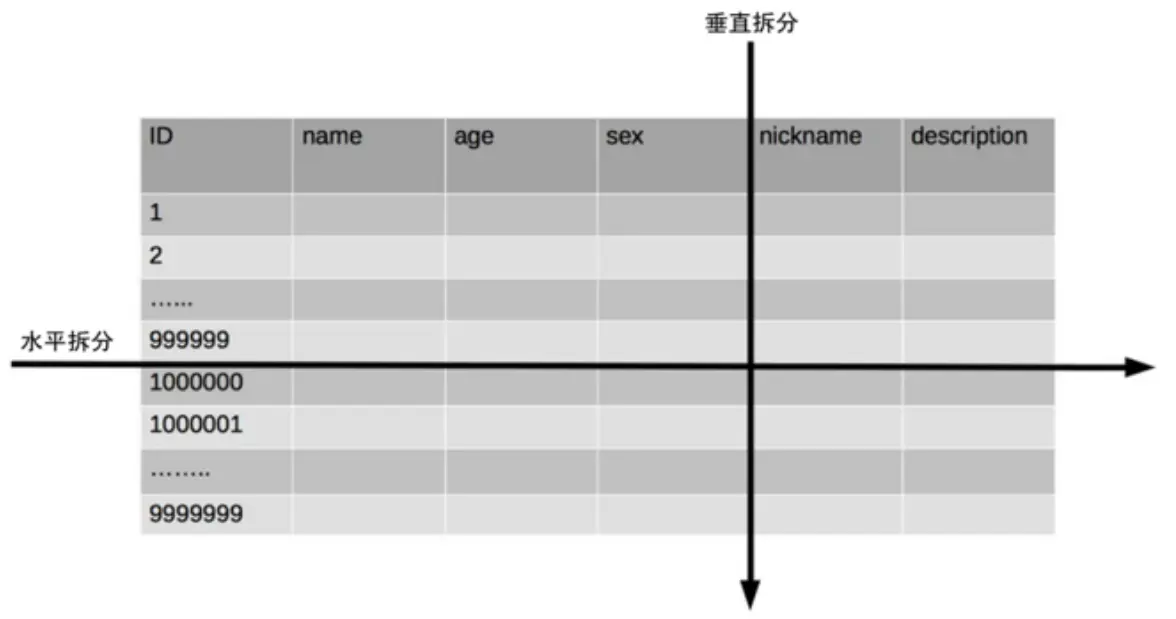
单表数据拆分有两种方式:垂直分表和水平分表。示意图如下:
垂直分表
- 垂直分表适合将表中某些不常用且占了大量空间的列拆分出去。
- 例如,前面示意图中的 nickname 和 description 字段,假设我们是一个婚恋网站,用户在筛选其他用户的时候,主要是用 age 和 sex 两个字段进行查询,而 nickname 和 description 两个字段主要用于展示,一般不会在业务查询中用到。description 本身又比较长,因此我们可以将这两个字段独立到另外一张表中,这样在查询 age 和 sex 时,就能带来一定的性能提升。
水平分表
水平分表适合表行数特别大的表,有的公司要求单表行数超过 5000 万就必须进行分表,这个数字可以作为参考,但并不是绝对标准,关键还是要看表的访问性能。对于一些比较复杂的表,可能超过 1000 万就要分表了;而对于一些简单的表,即使存储数据超过 1 亿行,也可以不分表。
但不管怎样,当看到表的数据量达到千万级别时,作为架构师就要警觉起来,因为这很可能是架构的性能瓶颈或者隐患。
水平分表相比垂直分表,会引入更多的复杂性,例如要求全局唯一的数据 id 该如何处理
主键自增
- 以最常见的用户 ID 为例,可以按照 1000000 的范围大小进行分段,1 ~ 999999 放到表 1 中,1000000 ~ 1999999 放到表 2 中,以此类推。
- 复杂点:分段大小的选取。分段太小会导致切分后子表数量过多,增加维护复杂度;分段太大可能会导致单表依然存在性能问题,一般建议分段大小在 100 万至 2000 万之间,具体需要根据业务选取合适的分段大小。
- 优点:可以随着数据的增加平滑地扩充新的表。例如,现在的用户是 100 万,如果增加到 1000 万,只需要增加新的表就可以了,原有的数据不需要动。
- 缺点:分布不均匀。假如按照 1000 万来进行分表,有可能某个分段实际存储的数据量只有 1 条,而另外一个分段实际存储的数据量有 1000 万条。
取模
- 同样以用户 ID 为例,假如我们一开始就规划了 10 个数据库表,可以简单地用 user_id % 10 的值来表示数据所属的数据库表编号,ID 为 985 的用户放到编号为 5 的子表中,ID 为 10086 的用户放到编号为 6 的子表中。
- 复杂点:初始表数量的确定。表数量太多维护比较麻烦,表数量太少又可能导致单表性能存在问题。
- 优点:表分布比较均匀。
- 缺点:扩充新的表很麻烦,所有数据都要重分布。
雪花算法
雪花算法是由 Twitter 公布的分布式主键生成算法,它能够保证不同表的主键的不重复性,以及相同表的主键的有序性。
核心思想:长度共 64bit(一个 long 型)。
首先是一个符号位,1bit 标识,由于 long 基本类型在 Java 中是带符号的,最高位是符号位,正数是 0,负数是 1,所以 id 一般是正数,最高位是 0。
41bit 时间截(毫秒级),存储的是时间截的差值(当前时间截 - 开始时间截),结果约等于 69.73 年。10bit 作为机器的 ID(5 个 bit 是数据中心,5 个 bit 的机器 ID,可以部署在 1024 个节点)。
12bit 作为毫秒内的流水号(意味着每个节点在每毫秒可以产生 4096 个 ID)。
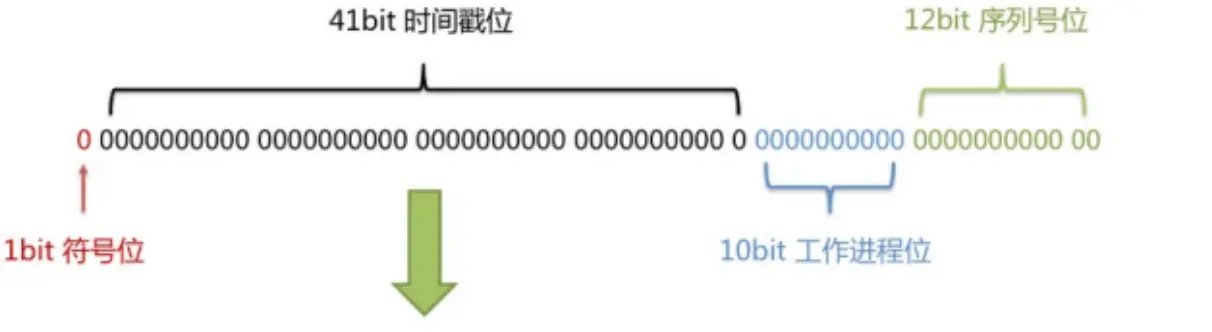
优点:整体上按照时间自增排序,并且整个分布式系统内不会产生 ID 碰撞,并且效率较高。
# @TableField
经过以上的测试,我们可以发现,MyBatis-Plus 在执行 SQL 语句时,要保证实体类中的属性名和表中的字段名一致
如果实体类中的属性名和字段名不一致的情况,会出现什么问题呢?
# 情况 1
若实体类中的属性使用的是驼峰命名风格,而表中的字段使用的是下划线命名风格
例如实体类属性 userName,表中字段 user_name
此时 MyBatis-Plus 会自动将下划线命名风格转化为驼峰命名风格相当于在 MyBatis 中配置
# 情况 2
若实体类中的属性和表中的字段不满足情况 1
例如实体类属性 name,表中字段 username
此时需要在实体类属性上使用 @TableField("username") 设置属性所对应的字段名
@Data
// 设置实体类所对应的表名
//@TableName("t_user")
public class User {
    // 将属性所对应的字段指定为主键
    // @TableId 注解的 value 属性用于指定主键的字段
    // @TableId 注解的 type 属性用于设置主键生成策略
//    @TableId(value = "uid", type = IdType.AUTO)
    @TableId(value = "uid")
    private Long id;
    // 指定属性所对应的字段名
    @TableField("user_name")
    private String name;
    private Integer age;
    private String email;
}
2
3
4
5
6
7
8
9
10
11
12
13
14
15
16
# @TableLogic
# 逻辑删除
- 物理删除:真实删除,将对应数据从数据库中删除,之后查询不到此条被删除的数据
- 逻辑删除:假删除,将对应数据中代表是否被删除字段的状态修改为“被删除状态”,之后在数据库中仍旧能看到此条数据记录
- 使用场景:可以进行数据恢复
# 实现逻辑删除
数据库中创建逻辑删除状态列,设置默认值为 0
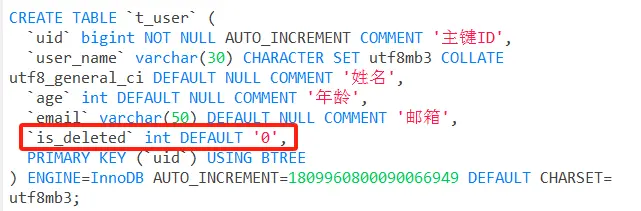
实体类中添加逻辑删除属性
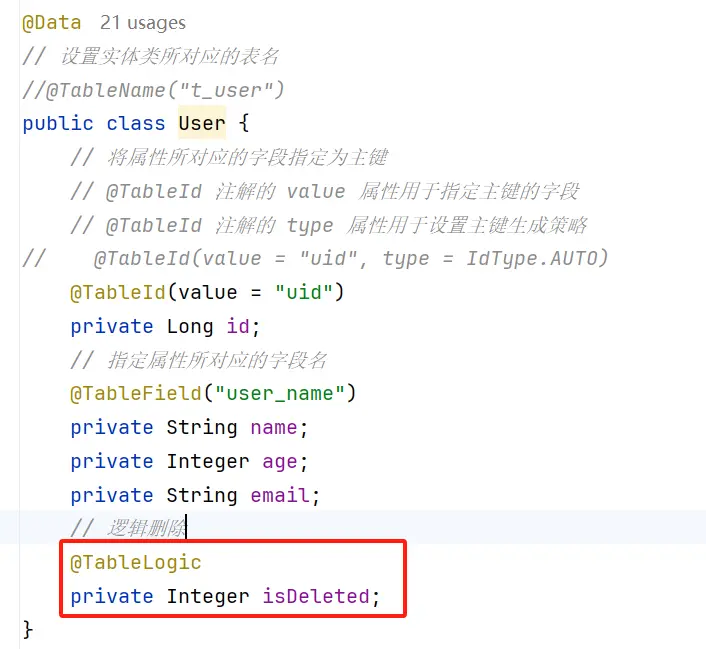
测试删除功能,真正执行的是修改
UPDATE t_user SET is_deleted=1 WHERE uid IN ( ? , ? , ? ) AND is_deleted=01测试查询功能,被逻辑删除的数据默认不会被查询,查询的结果为自动添加条件
is_deleted=0SELECT uid AS id,user_name AS name,age,email,is_deleted FROM t_user WHERE is_deleted=01
# 条件构造器和常用接口
# Wrapper 介绍
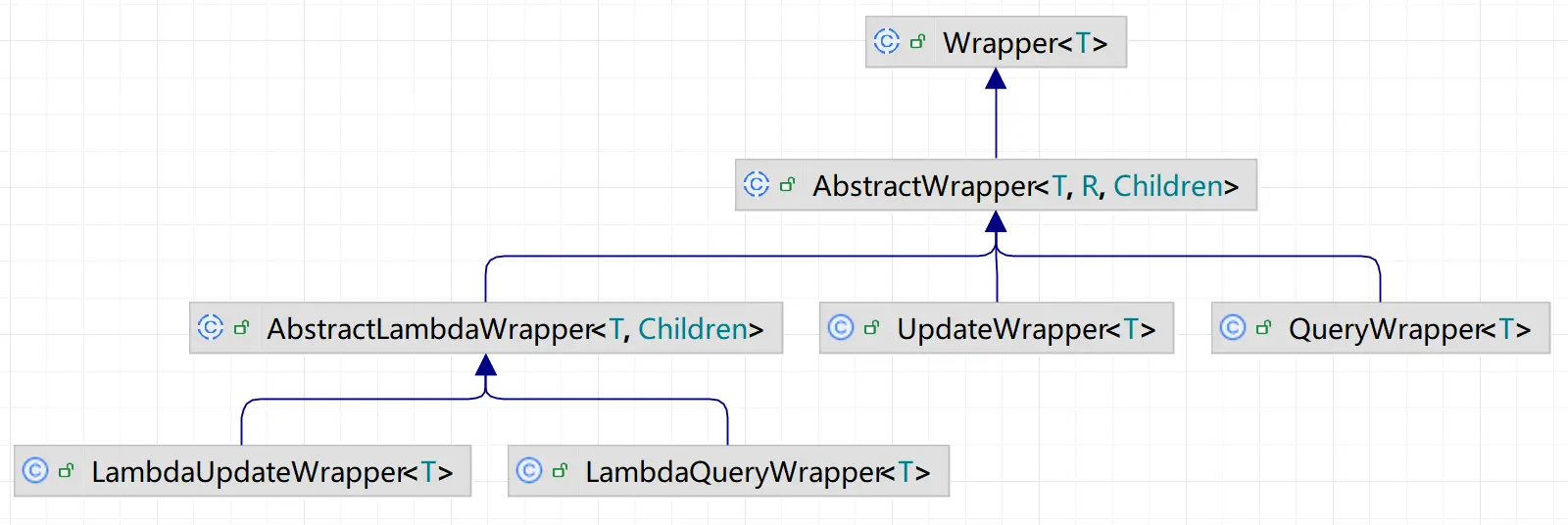
Wrapper : 条件构造抽象类,最顶端父类
- AbstractWrapper : 用于查询条件封装,生成 sql 的 where 条件
- QueryWrapper : 查询条件封装
- UpdateWrapper : Update 条件封装
- AbstractLambdaWrapper : 使用 Lambda 语法
- LambdaQueryWrapper :用于 Lambda 语法使用的查询 Wrapper
- LambdaUpdateWrapper : Lambda 更新封装 Wrapper
# QueryWrapper
# 例 1:组装查询条件
/**
 * 查询用户名包含 a,年龄在 20 到 30 之间,邮箱信息不为 null 的用户信息
 * SELECT uid AS id,user_name AS name,age,email,is_deleted FROM t_user WHERE is_deleted=0 AND
 * (user_name LIKE ? AND age BETWEEN ? AND ? AND email IS NOT NULL)
 */
@Test
public void test01() {
    QueryWrapper<User> queryWrapper = new QueryWrapper<>();
    queryWrapper.like("user_name", "a")
            .between("age", 20, 30)
                    .isNotNull("email");
    List<User> users = userMapper.selectList(queryWrapper);
    users.forEach(System.out::println);
}
2
3
4
5
6
7
8
9
10
11
12
13
14
# 例 2:组装排序条件
/**
 * 查询用户信息,按照年龄的降序排序,若年龄相同,则按照 id 升序排序
 * SELECT uid AS id,user_name AS name,age,email,is_deleted FROM t_user WHERE is_deleted=0 ORDER BY age DESC,uid ASC
 */
@Test
public void test02() {
    QueryWrapper<User> queryWrapper = new QueryWrapper<>();
    queryWrapper.orderByDesc("age")
                    .orderByAsc("uid");
    List<User> users = userMapper.selectList(queryWrapper);
    users.forEach(System.out::println);
}
2
3
4
5
6
7
8
9
10
11
12
# 例 3:组装删除条件
/**
 * 删除邮箱地址为 null 的用户信息
 * UPDATE t_user SET is_deleted=1 WHERE is_deleted=0 AND (email IS NOT NULL)
 */
@Test
public void test03() {
    QueryWrapper<User> queryWrapper = new QueryWrapper<>();
    queryWrapper.isNull("email");
    int result = userMapper.delete(queryWrapper);
    System.out.println("result = " + result);
}
2
3
4
5
6
7
8
9
10
11
# 例 4:条件的优先级
/**
 * 将(年龄大于20并且用户名中包含有a)或邮箱为null的用户信息修改
 * UPDATE t_user SET user_name=?, email=? WHERE is_deleted=0 AND (age > ? AND user_name LIKE ? OR email IS NULL)
 */
@Test
public void test04() {
    QueryWrapper<User> queryWrapper = new QueryWrapper<>();
    queryWrapper.gt("age", 20)
            .like("user_name", "a")
            .or()
            .isNull("email");
    User user = new User();
    user.setName("小明");
    user.setEmail("test@atguigu.com");
    int result = userMapper.update(user, queryWrapper);
    System.out.println("result = " + result);
}
2
3
4
5
6
7
8
9
10
11
12
13
14
15
16
17
/**
 * 将用户名中包含有a并且(年龄大于20或邮箱为null)的用户信息修改
 * lambda 中的条件优先执行
 * UPDATE t_user SET user_name=?, email=? WHERE is_deleted=0 AND (user_name LIKE ? AND (age > ? OR email IS NULL))
 */
@Test
public void test05() {
    QueryWrapper<User> queryWrapper = new QueryWrapper<>();
    queryWrapper.like("user_name", "a")
            .and(i -> i.gt("age", 20).or().isNull("email"));
    User user = new User();
    user.setName("小红");
    user.setEmail("test@atguigu.com");
    int result = userMapper.update(user, queryWrapper);
    System.out.println("result = " + result);
}
2
3
4
5
6
7
8
9
10
11
12
13
14
15
16
# 例 5:组装 select 子句
/**
 * 查询用户的用户名、年龄、邮箱信息
 * SELECT user_name,age,email FROM t_user WHERE is_deleted=0
 */
@Test
public void test06() {
    QueryWrapper<User> queryWrapper = new QueryWrapper<>();
    queryWrapper.select("user_name", "age", "email");
    List<Map<String, Object>> maps = userMapper.selectMaps(queryWrapper);
    maps.forEach(System.out::println);
}
2
3
4
5
6
7
8
9
10
11
# 例 6:实现子查询
/**
 * 查询 id 小于等于 100 的用户信息
 * SELECT uid AS id,user_name AS name,age,email,is_deleted FROM t_user
 * WHERE is_deleted=0 AND (uid IN (select uid from t_user where uid <= 100))
 */
@Test
public void test07() {
    QueryWrapper<User> queryWrapper = new QueryWrapper<>();
    queryWrapper.inSql("uid", "select uid from t_user where uid <= 100");
    userMapper.selectList(queryWrapper).forEach(System.out::println);
}
2
3
4
5
6
7
8
9
10
11
# UpdateWrapper
/**
 * 将用户名中包含有a并且(年龄大于20或邮箱为null)的用户信息修改
 * UPDATE t_user SET user_name=?,email=? WHERE is_deleted=0 AND (user_name LIKE ? AND (age > ? OR email IS NULL))
 */
@Test
public void test08() {
    UpdateWrapper<User> updateWrapper = new UpdateWrapper<>();
    updateWrapper.like("user_name", "a")
            .and(i -> i.gt("age", 20).or().isNull("email"));
    updateWrapper.set("user_name", "小黑").set("email", "abc@atguigu.com");
    int result = userMapper.update(updateWrapper);
    System.out.println("result = " + result);
}
2
3
4
5
6
7
8
9
10
11
12
13
# condition
在真正开发的过程中,组装条件是常见的功能,而这些条件数据来源于用户输入,是可选的,因此我们在组装这些条件时,必须先判断用户是否选择了这些条件,若选择则需要组装该条件,若没有选择则一定不能组装,以免影响 SQL 执行的结果
思路一:
@Test
public void test09() {
    String username = "a";
    Integer ageBegin = null;
    Integer ageEnd = 30;
    QueryWrapper<User> queryWrapper = new QueryWrapper<>();
    // isNotBlank 判断某个字符串是否不为空、不为 null、不为空白符
    if (StringUtils.isNotBlank(username)) {
        queryWrapper.like("user_name", username);
    }
    if (ageBegin != null) {
        queryWrapper.ge("age", ageBegin);
    }
    if (ageEnd != null) {
        queryWrapper.le("age", ageEnd);
    }
    userMapper.selectList(queryWrapper).forEach(System.out::println);
}
2
3
4
5
6
7
8
9
10
11
12
13
14
15
16
17
18
思路二:
上面的实现方案没有问题,但是代码比较复杂,我们可以使用带 condition 参数 的重载方法构建查询条件,简化代码的编写
@Test
public void test10() {
    String username = "a";
    Integer ageBegin = null;
    Integer ageEnd = 30;
    QueryWrapper<User> queryWrapper = new QueryWrapper<>();
    queryWrapper.like(StringUtils.isNotBlank(username), "user_name", username);
    queryWrapper.ge(ageBegin != null, "age", ageBegin);
    queryWrapper.le(ageEnd != null, "age", ageEnd);
    userMapper.selectList(queryWrapper).forEach(System.out::println);
}
2
3
4
5
6
7
8
9
10
11
# LambdaQueryWrapper
功能等同于 QueryWrapper,提供了 Lambda表达式 的语法可以避免填错列名。
@Test
public void test11() {
    String username = "a";
    Integer ageBegin = null;
    Integer ageEnd = 30;
    LambdaQueryWrapper<User> queryWrapper = new LambdaQueryWrapper<>();
    queryWrapper.like(StringUtils.isNotBlank(username), User::getName, username)
            .ge(ageBegin != null, User::getAge, ageBegin)
            .le(ageEnd != null, User::getAge, ageEnd);
    userMapper.selectList(queryWrapper).forEach(System.out::println);
}
2
3
4
5
6
7
8
9
10
11
# LambdaUpdateWrapper
/**
 * 将用户名中包含有a并且(年龄大于20或邮箱为null)的用户信息修改
 * UPDATE t_user SET user_name=?,email=? WHERE is_deleted=0 AND (user_name LIKE ? AND (age > ? OR email IS NULL))
 */
@Test
public void test12() {
    LambdaUpdateWrapper<User> updateWrapper = new LambdaUpdateWrapper<>();
    updateWrapper.like(User::getName, "a")
            .and(i -> i.gt(User::getAge, 20).or().isNull(User::getEmail));
    updateWrapper.set(User::getName, "小黑").set(User::getEmail, "abc@atguigu.com");
    int result = userMapper.update(updateWrapper);
    System.out.println("result = " + result);
}
2
3
4
5
6
7
8
9
10
11
12
13
# 插件
# 分页插件
MyBatis Plus 自带分页插件,只要简单的配置即可实现分页功能
# 添加配置类
package com.atguigu.mybatis_plus_demo.config;

@Configuration
// 扫描 mapper 接口所在的包
@MapperScan("com.atguigu.mybatis_plus_demo.mapper")
public class MyBatisPlusConfig {
    @Bean
    public MybatisPlusInterceptor mybatisPlusInterceptor() {
        MybatisPlusInterceptor interceptor = new MybatisPlusInterceptor();
        // 添加分页插件
        interceptor.addInnerInterceptor(new PaginationInnerInterceptor(DbType.MYSQL));
        return interceptor;
    }
}
2
3
4
5
6
7
8
9
10
11
12
13
14
# 测试
package com.atguigu.mybatis_plus_demo;

@SpringBootTest
public class MyBatisPlusPluginTest {
    @Resource
    private UserMapper userMapper;

    @Test
    public void testPage() {
        // new Page()中的两个参数分别是当前页码,每页显示数量
        Page<User> page = new Page<>(2, 3);
        userMapper.selectPage(page, null);
        System.out.println("page.getRecords() = " + page.getRecords());
        System.out.println("page.getCurrent() = " + page.getCurrent());
        System.out.println("page.getSize() = " + page.getSize());
        System.out.println("page.getPages() = " + page.getPages());
        System.out.println("page.getTotal() = " + page.getTotal());
        System.out.println("page.hasNext() = " + page.hasNext());
        System.out.println("page.hasPrevious() = " + page.hasPrevious());
    }
}
2
3
4
5
6
7
8
9
10
11
12
13
14
15
16
17
18
19
20
21
# xml 自定义分页
上面调用的是 MyBatis-Plus 提供的带有分页的方法,那么我们自己定义的方法如何实现分页呢?
# UserMapper 中定义接口方法
/**
 * 通过年龄查询用户信息并分页
 * @param page MyBatis-Plus 所提供的分页对象,必须位于第一个参数的位置
 * @param age 年龄
 * @return
 */
Page<User> selectPageVO(@Param("page") Page<User> page, @Param("age") Integer age);
2
3
4
5
6
7
# UserMapper.xml 中编写 SQL
<select id="selectPageVO" resultType="User">
    select uid, user_name, age, email from t_user where age > #{age}
</select>
2
3
# 测试
@Test
public void testPageVo() {
    Page<User> page = new Page<>(1, 3);
    userMapper.selectPageVO(page, 20);
    System.out.println("page.getRecords() = " + page.getRecords());
    System.out.println("page.getCurrent() = " + page.getCurrent());
    System.out.println("page.getSize() = " + page.getSize());
    System.out.println("page.getPages() = " + page.getPages());
    System.out.println("page.getTotal() = " + page.getTotal());
    System.out.println("page.hasNext() = " + page.hasNext());
    System.out.println("page.hasPrevious() = " + page.hasPrevious());
}
2
3
4
5
6
7
8
9
10
11
12
# 乐观锁
# 场景
- 一件商品,成本价是 80 元,售价是 100 元。老板先是通知小李,说你去把商品价格增加 50 元。小李正在玩游戏,耽搁了一个小时。正好一个小时后,老板觉得商品价格增加到 150 元,价格太高,可能会影响销量。又通知小王,你把商品价格降低 30 元。
- 此时,小李和小王同时操作商品后台系统。小李操作的时候,系统先取出商品价格 100 元;小王也在操作,取出的商品价格也是 100 元。小李将价格加了 50 元,并将 100+50=150 元存入了数据库;小王将商品减了 30 元,并将 100-30=70 元存入了数据库。是的,如果没有锁,小李的操作就完全被小王的覆盖了。
- 现在商品价格是 70 元,比成本价低 10 元。几分钟后,这个商品很快出售了 1 千多件商品,老板亏 1 万多。
# 乐观锁与悲观锁
- 上面的故事,如果是乐观锁,小王保存价格前,会检查下价格是否被人修改过了。如果被修改过了,则重新取出的被修改后的价格,150 元,这样他会将 120 元存入数据库。
- 如果是悲观锁,小李取出数据后,小王只能等小李操作完之后,才能对价格进行操作,也会保证最终的价格是 120 元。
# 模拟修改冲突
# 新增商品表并添加数据
CREATE TABLE t_product (
	id BIGINT (20) NOT NULL COMMENT '主键ID',
	name VARCHAR (30) NULL DEFAULT NULL COMMENT '商品名称',
	price INT (11) DEFAULT 0 COMMENT '价格',
	VERSION INT (11) DEFAULT 0 COMMENT '乐观锁版本号',
	PRIMARY KEY (id)
);

INSERT INTO t_product (id, name, price) VALUES (1, '外星人笔记本', 100);
2
3
4
5
6
7
8
9
# 添加实体
package com.atguigu.mybatis_plus_demo.pojo;

@Data
public class Product {
    private Long id;
    private String name;
    private Integer price;
    private Integer version;
}
2
3
4
5
6
7
8
9
添加 mapper
package com.atguigu.mybatis_plus_demo.mapper;
public interface ProductMapper extends BaseMapper<Product> {}
2
# 测试
@Resource
private ProductMapper productMapper;
@Test
public void testProduct01() {
    // 1. 小李查询商品价格
    Product productLi = productMapper.selectById(1L);
    System.out.println("小李查询的商品价格:" + productLi.getPrice());
    // 2. 小李查询商品价格
    Product productWang = productMapper.selectById(1L);
    System.out.println("小王查询的商品价格:" + productLi.getPrice());
    // 3. 小李将商品价格 + 50
    productLi.setPrice(productLi.getPrice() + 50);
    productMapper.updateById(productLi);
    // 4. 小王将商品价格 -30
    productWang.setPrice(productWang.getPrice() - 30);
    productMapper.updateById(productWang);
    // 5. 老板查询商品价格
    Product productBoss = productMapper.selectById(1L);
    System.out.println("老板查询的商品价格:" + productBoss.getPrice());
}
2
3
4
5
6
7
8
9
10
11
12
13
14
15
16
17
18
19
20
# 乐观锁实现流程
数据库中添加 version 字段
取出记录时,获取当前 version
SELECT id,`name`,price,`version` FROM product WHERE id=11更新时,version + 1,如果 where 语句中的 version 版本不对,则更新失败
UPDATE product SET price=price+50, `version`=`version` + 1 WHERE id=1 AND `version`=11
# Mybatis-Plus 实现乐观锁
# 修改实体类
添加 @Version 注解,表示乐观锁版本号字段
package com.atguigu.mybatis_plus_demo.pojo;

@Data
public class Product {
    private Long id;
    private String name;
    private Integer price;
    @Version    // 表示乐观锁版本号字段
    private Integer version;
}
2
3
4
5
6
7
8
9
10
# 添加乐观锁插件配置
package com.atguigu.mybatis_plus_demo.config;

@Configuration
// 扫描 mapper 接口所在的包
@MapperScan("com.atguigu.mybatis_plus_demo.mapper")
public class MyBatisPlusConfig {
    @Bean
    public MybatisPlusInterceptor mybatisPlusInterceptor() {
        MybatisPlusInterceptor interceptor = new MybatisPlusInterceptor();
        // 添加分页插件
        interceptor.addInnerInterceptor(new PaginationInnerInterceptor(DbType.MYSQL));
        // 添加乐观锁插件
        interceptor.addInnerInterceptor(new OptimisticLockerInnerInterceptor());
        return interceptor;
    }
}
2
3
4
5
6
7
8
9
10
11
12
13
14
15
16
# 测试修改冲突
小李查询商品信息:
SELECT id,name,price,version FROM t_product WHERE id=?1小王查询商品信息:
SELECT id,name,price,version FROM t_product WHERE id=?1小李修改商品价格,自动将 version+1
UPDATE t_product SET name=?, price=?, version=? WHERE id=? AND version=?
Parameters: 外星人笔记本(String), 150(Integer), 1(Integer), 1(Long), 0(Integer)
Updates: 1
1
2
3小王修改商品价格,此时 version 已更新,条件不成立,修改失败
UPDATE t_product SET name=?, price=?, version=? WHERE id=? AND version=?
Parameters: 外星人笔记本(String), 70(Integer), 1(Integer), 1(Long), 0(Integer)
Updates: 0
1
2
3最终,小王修改失败,查询价格:150
SELECT id,name,price,version FROM t_product WHERE id=?1
# 优化流程
@Test
public void testProduct01() {
    // 1. 小李查询商品价格
    Product productLi = productMapper.selectById(1);
    System.out.println("小李查询的商品价格:" + productLi.getPrice());
    // 2. 小李查询商品价格
    Product productWang = productMapper.selectById(1);
    System.out.println("小王查询的商品价格:" + productLi.getPrice());
    // 3. 小李将商品价格 + 50
    productLi.setPrice(productLi.getPrice() + 50);
    productMapper.updateById(productLi);
    // 4. 小王将商品价格 -30
    productWang.setPrice(productWang.getPrice() - 30);
    int result = productMapper.updateById(productWang);
    if (result == 0) {
        // 操作失败,重试
        Product productNew = productMapper.selectById(1);
        productNew.setPrice(productNew.getPrice() - 30);
        productMapper.updateById(productNew);
    }
    // 5. 老板查询商品价格
    Product productBoss = productMapper.selectById(1L);
    System.out.println("老板查询的商品价格:" + productBoss.getPrice());
}
2
3
4
5
6
7
8
9
10
11
12
13
14
15
16
17
18
19
20
21
22
23
24

# 通用枚举
表中的有些字段值是固定的,例如性别(男或女),此时我们可以使用 MyBatis-Plus 的通用枚举来实现
数据库表添加字段 sex
CREATE TABLE `t_user` (
  `uid` bigint NOT NULL AUTO_INCREMENT COMMENT '主键ID',
  `user_name` varchar(30) CHARACTER SET utf8mb3 COLLATE utf8_general_ci DEFAULT NULL COMMENT '姓名',
  `age` int DEFAULT NULL COMMENT '年龄',
  `email` varchar(50) DEFAULT NULL COMMENT '邮箱',
  `sex` int DEFAULT NULL,
  `is_deleted` int DEFAULT '0',
  PRIMARY KEY (`uid`) USING BTREE
) ENGINE=InnoDB DEFAULT CHARSET=utf8mb3;
1
2
3
4
5
6
7
8
9创建通用枚举类型
package com.atguigu.mybatis_plus_demo.enums;

@Getter
public enum SexEnum {

    MALE(1, "男"),
    FEMALE(2, "女");

    @EnumValue // 将注解所标识的属性的值存储到数据库中
    private final Integer sex;
    private final String sexName;

    SexEnum(Integer sex, String sexName) {
        this.sex = sex;
        this.sexName = sexName;
    }
}
1
2
3
4
5
6
7
8
9
10
11
12
13
14
15
16
17User 实体类中添加属性 sex
package com.atguigu.mybatis_plus_demo.pojo;

import com.atguigu.mybatis_plus_demo.enums.SexEnum;
import com.baomidou.mybatisplus.annotation.TableField;
import com.baomidou.mybatisplus.annotation.TableId;
import com.baomidou.mybatisplus.annotation.TableLogic;
import lombok.Data;

@Data
public class User {
    @TableId(value = "uid")
    private Long id;
    // 指定属性所对应的字段名
    @TableField("user_name")
    private String name;
    private Integer age;
    private String email;
    private SexEnum sex;
    @TableLogic
    private Integer isDeleted;
}
1
2
3
4
5
6
7
8
9
10
11
12
13
14
15
16
17
18
19
20
21
22配置扫描通用枚举
mybatis-plus 3.5.2 版本开始无需配置扫描枚举了
spring:
  # 配置数据源信息
  datasource:
    # 配置数据源类型
    type: com.zaxxer.hikari.HikariDataSource
    # 配置连接数据库的各个信息
    driver-class-name: com.mysql.cj.jdbc.Driver
    url: jdbc:mysql://localhost:3306/mybatis_plus?serverTimezone=GMT%2B8&characterEncoding=utf-8&useSSL=false&allowPublicKeyRetrieval=true
    username: root
    password: 123456
# MyBatis-Plus相关配置
mybatis-plus:
  configuration:
    log-impl: org.apache.ibatis.logging.stdout.StdOutImpl
  # 配置 MyBatis-Plus 的全局配置
  global-config:
    db-config:
      # 设置实体类所对应的表的统一前缀
      table-prefix: t_
      # 设置同意的主键生成策略
      id-type: auto
  # 配置类型别名所对应的包
  type-aliases-package: com.atguigu.mybatis_plus_demo.pojo
  # 扫描通用枚举的包(mybatis-plus 3.5.2 版本开始无需配置扫描枚举了)
  # type-enums-package: com.atguigu.mybatis_plus_demo.enums
1
2
3
4
5
6
7
8
9
10
11
12
13
14
15
16
17
18
19
20
21
22
23
24
25测试
package com.atguigu.mybatis_plus_demo;

@SpringBootTest
public class MyBatisPlusEnumTest {
    @Resource
    private UserMapper userMapper;

    @Test
    public void test() {
        User user = new User();
        user.setName("admin");
        user.setAge(33);
        user.setSex(SexEnum.MALE);
        int result = userMapper.insert(user);
        System.out.println("result = " + result);
    }
}
1
2
3
4
5
6
7
8
9
10
11
12
13
14
15
16
17
# 代码生成器
# 多数据源
适用于多种场景:纯粹多库、 读写分离、 一主多从、 混合模式等
场景说明:
我们创建两个库,分别为:
mybatis_plus(以前的库不动)与mybatis_plus_1(新建),将mybatis_plus库的product表移动到mybatis_plus_1库,这样每个库一张表,通过一个测试用例分别获取用户数据与商品数据,如果获取到说明多库模拟成功
@DS 可以注解在方法上或类上,同时存在就近原则 方法上注解 优先于 类上注解。
# 创建数据库及表
- 创建数据库
mybatis_plus_1和表product - 添加测试数据
- 删除
mybatis_plus库中的product表
CREATE DATABASE `mybatis_plus_1` /*!40100 DEFAULT CHARACTER SET utf8mb4 */;
USE `mybatis_plus_1`;
CREATE TABLE t_product (
	id BIGINT (20) NOT NULL COMMENT '主键ID',
	name VARCHAR (30) NULL DEFAULT NULL COMMENT '商品名称',
	price INT (11) DEFAULT 0 COMMENT '价格',
	version INT (11) DEFAULT 0 COMMENT '乐观锁版本号',
	PRIMARY KEY (id)
);

INSERT INTO t_product (id, name, price) VALUES (1, '外星人笔记本', 100);

USE mybatis_plus;
DROP TABLE IF EXISTS t_product;
2
3
4
5
6
7
8
9
10
11
12
13
14
# 新建工程并引入依赖
<?xml version="1.0" encoding="UTF-8"?>
<project xmlns="http://maven.apache.org/POM/4.0.0" xmlns:xsi="http://www.w3.org/2001/XMLSchema-instance"
         xsi:schemaLocation="http://maven.apache.org/POM/4.0.0 https://maven.apache.org/xsd/maven-4.0.0.xsd">
    <modelVersion>4.0.0</modelVersion>
    <parent>
        <groupId>org.springframework.boot</groupId>
        <artifactId>spring-boot-starter-parent</artifactId>
        <version>2.6.13</version>
        <relativePath/> <!-- lookup parent from repository -->
    </parent>
    <groupId>com.atguigu</groupId>
    <artifactId>mybatis_plus_datasource</artifactId>
    <version>0.0.1-SNAPSHOT</version>
    <name>mybatis_plus_datasource</name>
    <description>mybatis_plus_datasource</description>
    <properties>
        <java.version>8</java.version>
    </properties>
    <dependencies>
        <dependency>
            <groupId>org.springframework.boot</groupId>
            <artifactId>spring-boot-starter</artifactId>
        </dependency>

        <dependency>
            <groupId>org.springframework.boot</groupId>
            <artifactId>spring-boot-starter-test</artifactId>
            <scope>test</scope>
        </dependency>

        <!-- mybatis-plus 启动器 -->
        <dependency>
            <groupId>com.baomidou</groupId>
            <artifactId>mybatis-plus-boot-starter</artifactId>
            <version>3.5.7</version>
        </dependency>
        <dependency>
            <groupId>com.baomidou</groupId>
            <artifactId>dynamic-datasource-spring-boot-starter</artifactId>
            <version>4.3.1</version>
        </dependency>
        <!-- lombok 用于简化实体类开发 -->
        <dependency>
            <groupId>org.projectlombok</groupId>
            <artifactId>lombok</artifactId>
            <optional>true</optional>
        </dependency>
        <!-- mysql 驱动 -->
        <dependency>
            <groupId>mysql</groupId>
            <artifactId>mysql-connector-java</artifactId>
            <scope>runtime</scope>
        </dependency>
    </dependencies>

    <build>
        <plugins>
            <plugin>
                <groupId>org.springframework.boot</groupId>
                <artifactId>spring-boot-maven-plugin</artifactId>
            </plugin>
        </plugins>
    </build>

</project>
2
3
4
5
6
7
8
9
10
11
12
13
14
15
16
17
18
19
20
21
22
23
24
25
26
27
28
29
30
31
32
33
34
35
36
37
38
39
40
41
42
43
44
45
46
47
48
49
50
51
52
53
54
55
56
57
58
59
60
61
62
63
64
65
# 编写配置文件配置多数据源
说明:注释掉之前的数据库连接,添加新配置
spring:
  # 配置数据源信息
  datasource:
    dynamic:
      # 设置默认的数据源或者数据源组,默认值即为master
      primary: master
      # 严格匹配数据源,默认false.true未匹配到指定数据源时抛异常,false使用默认数据源
      strict: false
      datasource:
        master:
          url: jdbc:mysql://localhost:3306/mybatis_plus?serverTimezone=GMT%2B8&characterEncoding=utf-8&useSSL=false&allowPublicKeyRetrieval=true
          driver-class-name: com.mysql.cj.jdbc.Driver
          username: root
          password: 123456
        slave_1:
          url: jdbc:mysql://localhost:3306/mybatis_plus_1?serverTimezone=GMT%2B8&characterEncoding=utf-8&useSSL=false&allowPublicKeyRetrieval=true
          driver-class-name: com.mysql.cj.jdbc.Driver
          username: root
          password: 123456
2
3
4
5
6
7
8
9
10
11
12
13
14
15
16
17
18
19
# 创建实体类
新建一个
User实体类package com.atguigu.mybatis_plus_datasource.pojo; @Data @TableName("t_user") public class User { @TableId private Long uid; private String userName; private Integer age; private String email; private Integer sex; private Integer isDeleted; }1
2
3
4
5
6
7
8
9
10
11
12
13新建一个实体类
Productpackage com.atguigu.mybatis_plus_datasource.pojo; @Data @TableName("t_product") public class Product { private Long id; private String name; private Integer price; private Integer version; }1
2
3
4
5
6
7
8
9
10
# 创建 Mapper 及 Service
新建接口
UserMapperpackage com.atguigu.mybatis_plus_datasource.mapper; @Repository public interface UserMapper extends BaseMapper<User> {}1
2
3
4新建接口
ProductMapperpackage com.atguigu.mybatis_plus_datasource.mapper; @Repository public interface ProductMapper extends BaseMapper<Product> {}1
2
3
4新建 Service 接口
UserService指定操作的数据源package com.atguigu.mybatis_plus_datasource.service; public interface UserService extends IService<User> {}1
2
3新建实现类
UserServiceImplpackage com.atguigu.mybatis_plus_datasource.service.impl; @Service @DS("master") public class UserServiceImpl extends ServiceImpl<UserMapper, User> implements UserService {}1
2
3
4
5新建 Service 接口
ProductService指定操作的数据源package com.atguigu.mybatis_plus_datasource.service; public interface ProductService extends IService<Product> {}1
2
3新建实现类
ProductServiceImplpackage com.atguigu.mybatis_plus_datasource.service.impl; @Service @DS("slave_1") public class ProductServiceImpl extends ServiceImpl<ProductMapper, Product> implements ProductService {}1
2
3
4
5
# 启动类
package com.atguigu.mybatis_plus_datasource;

@SpringBootApplication
@MapperScan("com.atguigu.mybatis_plus_datasource.mapper")
public class MybatisPlusDatasourceApplication {
    public static void main(String[] args) {
        SpringApplication.run(MybatisPlusDatasourceApplication.class, args);
    }
}
2
3
4
5
6
7
8
9
10
# 测试
package com.atguigu.mybatis_plus_datasource;

@SpringBootTest
class MybatisPlusDatasourceApplicationTests {

    @Resource
    private UserService userService;

    @Resource
    private ProductService productService;

    @Test
    public void test() {
        System.out.println(userService.getById(1));
        System.out.println(productService.getById(1));
    }

}
2
3
4
5
6
7
8
9
10
11
12
13
14
15
16
17
18
结果:
- 都能顺利获取对象,则测试成功
- 如果我们实现读写分离,将写操作方法加上主库数据源,读操作方法加上从库数据源,自动切换,是不是就能实现读写分离?
# MyBatisX 插件
MyBatis-Plus 为我们提供了强大的 mapper 和 service 模板,能够大大的提高开发效率
但是在真正开发过程中,MyBatis-Plus 并不能为我们解决所有问题,例如一些复杂的 SQL,多表联查,我们就需要自己去编写代码和 SQL 语句,我们该如何快速的解决这个问题呢,这个时候可以使用 MyBatisX 插件
MyBatisX 一款基于 IDEA 的快速开发插件,为效率而生。
用法:Mybatis X 插件 (opens new window)